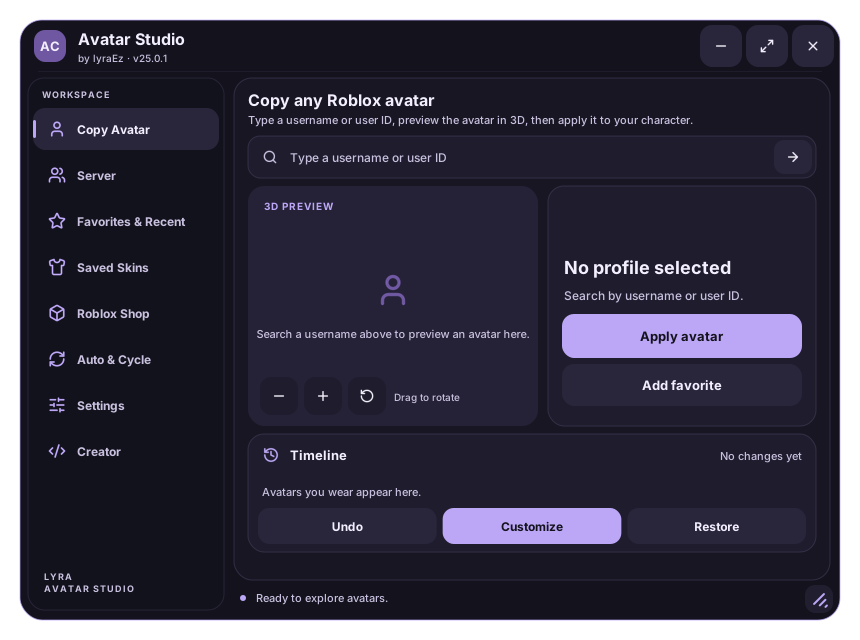
- Type a username,
@nameor user ID. - Drag the 3D preview to look around.
- Tap Apply avatar. Undo and Restore bring you back.
Free · Open source · No key system
Wear any Roblox avatar in one tap
Type a username, see the avatar in 3D and put it on your character. Save your favourite looks, try items from the catalog and switch avatars while you play.
Runs on your device. Only you see the new avatar.
- 8tabs in one window
- 100saved skins
- 50avatars in a cycle
- R6 + R15PC and phone
Everything in one window
Eight tabs, zero confusion
Each tab does one thing. Tap a card to see how to use it.
- Filter the list by name or ID.
- Wear puts their avatar on you right away.
- Preview shows it in 3D first. The star saves them to Favorites.
- Up to 200 favorites and your last 30 searches.
- Both lists are saved on your device.
- Wearing a favorite always loads the avatar they have today.
- Dress up, type a name and tap Save.
- Wear it again in any game, exactly as it was.
- Share turns it into a code a friend can import.
- Search by name, item ID or catalog link.
- Filter hair, heads, clothes, emotes and more.
- Add or Remove items. Nothing is bought.
- Put an avatar on as soon as the script starts.
- Add up to 50 avatars to the cycle list.
- Switch on death, on respawn or every few minutes.
- Make the window bigger or smaller.
- Keep your avatar after respawns and new rounds.
- Choose how to reopen the window when it is hidden.
- Join the Discord for updates and help.
- See the GitHub profile of lyraEz.
- Tap a link to copy it.
- Keeps your avatar after respawn
- Puts back items the game removes
- Visual-only mode for tricky games
- Free camera and hotkeys
- Undo anything
How it works
Three steps. That's it.
-
1
Copy the script
Tap Copy in the box below. It is one line.
-
2
Run it in your executor
Paste it, press run. The Avatar Studio window opens.
-
3
Type a name, tap Apply
Search anyone in Copy Avatar and tap Apply avatar.
Changed your mind? Undo goes back one step and Restore brings back your own avatar.
Get the script
Copy, paste, play
loadstring(game:HttpGet("https://raw.githubusercontent.com/lyraEz/Source-Avatar-Copier/main/src/avatar-copier.lua"))()You need a Roblox executor that runs client scripts. Third-party executors are against the Roblox Terms of Use, so use them at your own risk.
Free and open
Nothing hidden
Free, always
No key system, no link shorteners, no payment.
Open source
Every line is public under the GPL-3.0 license. Read it, learn from it, improve it.
Your data stays with you
No analytics. Favorites, skins and settings are saved only on your device.
Checks what it reads
Shared codes are checked before anything is built from them.
Questions
Good to know
No. The change happens on your device, so other players keep seeing your normal avatar. The exception is animations: Roblox shows the animations your character plays to everyone.
Tap Restore below the preview. Undo goes back one step, and the timeline pictures go back to any look of the session.
Tap the floating AC button, press Right Ctrl, type /e copier in chat, or open and close the Roblox menu 3 times in a row.
Respawn, then open Settings, tap Show advanced options and turn on Visual-only avatar. It draws the avatar over your character without changing it.
Yes. The window adapts to small screens and everything in it works by touch. Only the keyboard shortcuts need a keyboard.
Yes, and it always has been. There is no key system and nothing to buy, and the full source code is public.